
Minna Kotoba1.5 - Get APK
You'll be able to download in few seconds.
Publisher Description
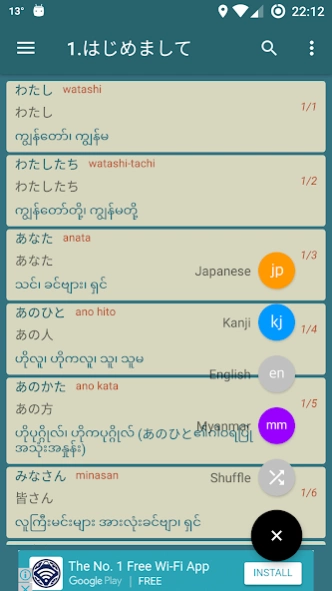
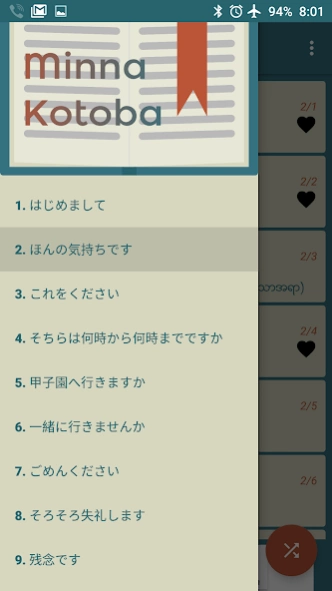
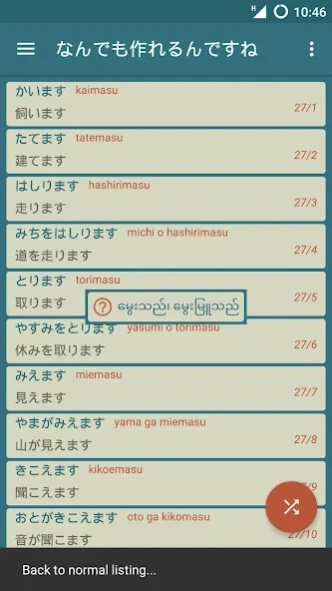
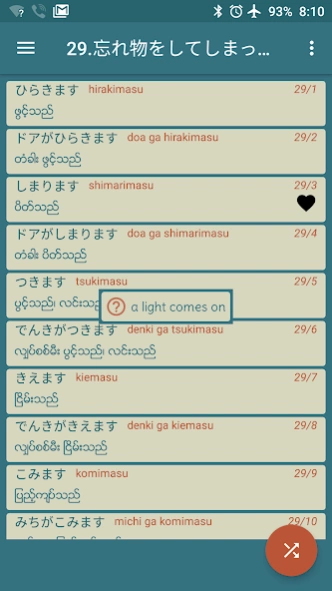
Minna no Nihongo Text Book Vocabulary app. All chapters vocabularies included.
(Zawgyi)
This App is studying Japanese friends in the country. Minna book offers over 2 terms. So 50 from Chapter 1. N5, N4's friends certainly useful.
To distinction App
- vocabulary memorizing drink revolver
- click on the words on each visit to appear in English study
Ability to mark favorite vocabulary terms (by long pressing on the store, remove)
- the first app to use, but again leave the room where last crawled automatically marked
Zawgyi given font Unicode font support, as well as lack of a Myanmar font phones Zawgyi embed On Internet use
- the terms of Chapter 50's, Japan, English is not easy to find
- Japanese pronunciation (using Android TextToSpeech Setting> Language & Input> Text-to-speech output> Google TTS voice data> Japanese downloaded putting Minna Kotoba, just click on the vocabulary and pronunciation)
- * Android version 2.3 or above since given support
In this App includes 3 ကူညီပေးခဲ့ကြတဲ့ friend
Wai Lin Zaw Nu Nu Paul Denisowski June, and I would like to say thanks.
App word mistakes, You can have many needs. You can send email if you would like to suggest something thura.ucsy@gmail.com.
* MinnaKotoba 1.3 and above, Android 3.1 support was arranged, so Android 2.3 users can use the following link to download you need.
MinnaKotoba 1.2 Download => https://github.com/thurag/minnakotoba/raw/gh-pages/MinnaKotoba1.2.apk
.................................................. ............................................
(Myanmar Unicode)
This App is studying Japanese friends in the country. Minna book offers over 2 terms. So from 1 up to 50 rooms. N5, N4 friends will certainly useful.
To distinction App
- vocabulary memorizing drink revolver
- click on the words on each visit to appear in English study
Ability to mark favorite vocabulary terms (long press on the store, remove)
- App leave the room before use, although it again last crawled place automatically marked
Zawgyi given font Unicode font support, as well as lack of a Myanmar font phones Zawgyi embed, to be used by the No On
- the terms of Chapter 50's, Japan, English is not easy to find
- Japanese pronunciation (using Android TextToSpeech Setting> Language & Input> Text-to-speech output> Google TTS voice data> Japanese downloaded putting Minna Kotoba, just click on the vocabulary and pronunciation)
- * Android version 2.3 or above since given support
In this App includes 3 ကူညီပေးခဲ့ကြတဲ့ friend
Wai Lin Zaw Nu Nu Paul Denisowski June, and I would like to say thanks.
App word mistakes, You can have many needs. You can send email if you would like to suggest something thura.ucsy@gmail.com.
* MinnaKotoba 1.3 and above, Android 3.1 support was arranged, so Android 2.3 users can use the link below to download the need you.
MinnaKotoba 1.2 Download => https://github.com/thurag/minnakotoba/raw/gh-pages/MinnaKotoba1.2.apk
About Minna Kotoba
The company that develops Minna Kotoba is Thura Aung. The latest version released by its developer is 1.5.
To install Minna Kotoba on your Android device, just click the green Continue To App button above to start the installation process. The app is listed on our website since 2021-09-26 and was downloaded 0 times. We have already checked if the download link is safe, however for your own protection we recommend that you scan the downloaded app with your antivirus. Your antivirus may detect the Minna Kotoba as malware as malware if the download link to edu.thuraaung.minnakotoba is broken.
How to install Minna Kotoba on your Android device:
- Click on the Continue To App button on our website. This will redirect you to Google Play.
- Once the Minna Kotoba is shown in the Google Play listing of your Android device, you can start its download and installation. Tap on the Install button located below the search bar and to the right of the app icon.
- A pop-up window with the permissions required by Minna Kotoba will be shown. Click on Accept to continue the process.
- Minna Kotoba will be downloaded onto your device, displaying a progress. Once the download completes, the installation will start and you'll get a notification after the installation is finished.
Program Details
System requirements
Download information
Pricing
Version History
version 1.5
posted on 2021-09-26
Romaji button separated from Japanese FAB (Floating Action Button)
version 1.4
posted on 2019-07-21
Minna Kotoba 1.4 မွာ အဓိက စာလုံးပေါင္းအမွားေတြပဲ ျပင္ေပးထားပါတယ္။
အခန္း ၁၄ ကမွားေနတဲ့ အစဥ္လိုက္ေတြကို ျပန္ျပင္ေပးထားပါတယ္။
ျပီးေတာ့ တစ္ျခား ေသးေသးေသးေသး မွားေနတာေလးေတြလည္း ျပင္ထားပါတယ္။
Google Play Store မရွိတဲ့သူေတြအတြက္ ေအာက္ကလင့္ကေန တိုက္႐ုိက္ေဒါင္းလုပ္လုပ္ၿပီး အသုံးျပဳနိုင္ပါတယ္
https://github.com/thuraucsy/thuraucsy.github.io/blob/master/minna_kotoba/app-release.apk?raw=true
version 1.3
posted on 2017-10-17
အသစ်ပါလာတာတွေကတော့
- သင်ခန်းစာတစ်ခုချင်းဆီမှာ Searching
- ဂျပန်၊ ခန်းဂျီး၊ အင်္ဂလိပ်၊ မြန်မာ ပြတာ၊ မပြတာတွေကိုလည်းပဲ Setting ထဲဝင်စရာမလိုဘဲ Shuffle ခလုတ်နေရာမှာပဲ လုပ်နိုင်လာပါပြီ။
ပြင်ဆင်လိုက်တာတွေကတော့
- Favorite စာလုံးတွေကို Shuffle လုပ်လိုက်ရင် တလွဲစီဖြစ်သွားတာတွေကို ပြန်ပြင်ထားပါတယ်
- Android 2.3 သုံးတဲ့သူတွေအနေနဲ့ သုံးလို့ရမှာမဟုတ်တော့လို့ Version 1.2 ကို အောက်ကလင့်ကနေ Download ဆွဲပြီး အသုံးပြုပေးပါ။ 2.3 MB ရှိပါတယ်။
https://github.com/thurag/minnakotoba/raw/gh-pages/MinnaKotoba1.2.apk
version 1.1
posted on 2016-09-06
Disclaimer
External Download
We do not host Minna Kotoba on our servers. We did not scan it for viruses, adware, spyware or other type of malware. This app is hosted by Galad and passed their terms and conditions to be listed there. We recommend caution when installing it.
The APK Download link for Minna Kotoba is provided to you by apps112.com without any warranties, representations or guarantees of any kind, so access it at your own risk.
If you have questions regarding this particular app contact the publisher directly. For questions about the functionalities of apps112.com contact us.
